本例将设计一个具体文件操作界面,允许用户删除指定目录下的所有文本文件,运行结果如图11.17所示。
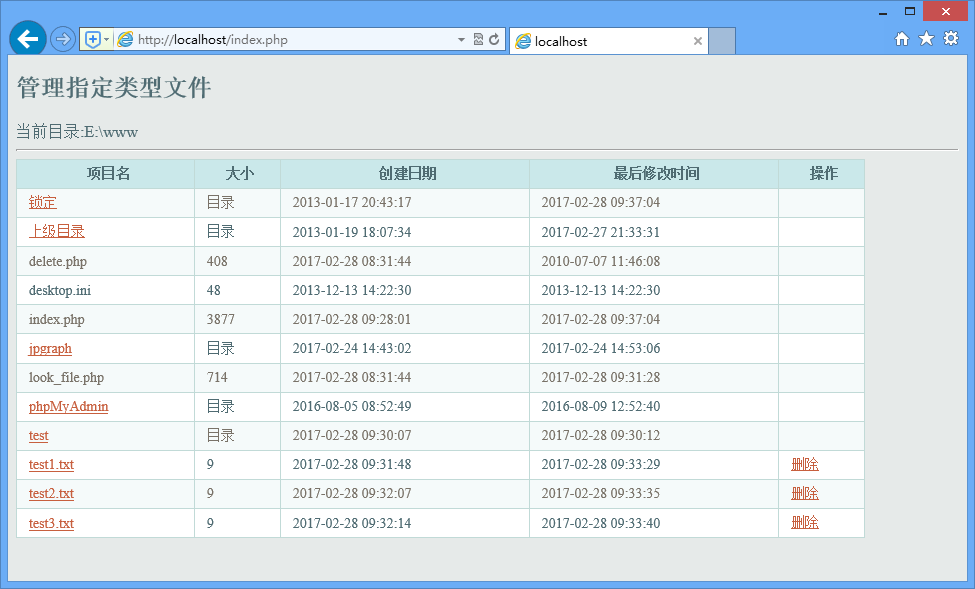
图11.17 管理指定类型文件
【操作步骤】
第1步,创建index.php,设计一个表格,遍历当前目录所有文件。删除指定目录下特定格式文件的实现原理与删除所有文件相同,只是在创建删除链接前对文件的格式进行判断,如果文件是.txt类型,那么就输出删除的超链接,否则将直接输出文件的名称。
<table>
    <tr>
        <th>项目名</th>
        <th>大小</th>
        <th>创建日期</th>
        <th>最后修改时间</th>
        <th>操作</th>
    </tr>
    <?php
if (! isset ( $_GET ['catalog']  ) || empty ( $_GET ['catalog'] ))
    $current_directory = getcwd (); //获得脚本目录
else
    $current_directory = $_GET ['catalog'];
chdir ( iconv (  "utf-8", "gb2312", $current_directory ) ); //改变当前目录
echo "<span  class='STYLE4'>当前目录:</span><span class='STYLE2'>" . iconv (  "gb2312", "utf-8", getcwd () ) .  "</span><hr>";
$ml = opendir ( iconv (  "utf-8", "gb2312", $current_directory ) ); //打开目录
$php_self =  $_SERVER['PHP_SELF'];
while ( $gain_directory =  readdir ( $ml ) ) { //循环读取目录中的目录及文件
    echo "<tr><td>";
    if (is_dir ( $gain_directory )) { //判断是目录
        if ($gain_directory == ".") {
            $catalog = getcwd (); //显示当前目录
            $catalog = iconv (  "gb2312", "utf-8", $catalog );
            echo "<a  href=$php_self?catalog=".urlencode($catalog).">锁定</a>";
        } elseif ($gain_directory ==  "..") {
            $catalog = getcwd () . "\..";  //上级目录
            $catalog = iconv (  "gb2312", "utf-8", $catalog );
            echo "<a  href=$php_self?catalog=".urlencode($catalog).">上级目录</a>";
        } else {
            $catalog = getcwd () .  "\$gain_directory"; //子目录
            $catalog = iconv (  "gb2312", "utf-8", $catalog );
            echo "<a  href=$php_self?catalog=".urlencode($catalog).">" . iconv (  "gb2312", "utf-8", $gain_directory ) .  "</a>";
        }
    } else {
        $ext = substr ( $gain_directory,  strrpos ( $gain_directory, "." ) );
        if (strtoupper ( $ext ) ==  ".TXT" ) {
            $catalog = getcwd ();
            $catalog = iconv (  "gb2312", "utf-8", $catalog );
            echo "<a  href=./look_file.php?catalog=".urlencode($catalog)."&filename="  . urlencode(iconv ( "gb2312", "utf-8", $gain_directory )) .  "&type=" . urlencode($ext) . ">" . iconv (  "gb2312", "utf-8", $gain_directory ) . "</a>";
        } else {
            echo iconv ( "gb2312",  "utf-8", $gain_directory );
        }
    }
    if (is_dir ( $gain_directory ))
        $file_size = "目录";
    else
    $file_size = filesize ( $gain_directory );
    echo  "<td>$file_size</td>";
    $create_time = date ( "Y-m-d  H:i:s", filectime ( $gain_directory ) );
    echo "<td>" . iconv (  "gb2312", "utf-8", $create_time ) .  "</td>";
    $update_time = date ( "Y-m-d  H:i:s", filemtime ( $gain_directory ) );
    echo  "<td>$update_time</td>";
    echo "<td>";
    if ($gain_directory == ".") {
        $catalog = getcwd (); //显示当前目录
    } elseif ($gain_directory ==  "..") {
        $catalog = getcwd () .  "\.."; //上级目录
    } else {
        $catalog = getcwd () .  "\$gain_directory"; //子目录
        $ext = substr ( $gain_directory,  strrpos ( $gain_directory, "." ) );
        if (strtoupper ( $ext ) == ".TXT")  {
            echo "<a  href='delete.php?catalog=".urlencode($catalog)."&filename="  . urlencode(getcwd ()) . "' title='删除目录或者文件' >删除</a>";
        } else {
            //echo iconv ( "gb2312",  "utf-8", $gain_directory );
        }
    }
    echo "</td>";
    echo "</tr>";
}
closedir ( $ml );
?>
</table>
第2步,创建look_file.php文件,完成对.txt’后缀文件的读取操作。
<a  href="index.php">返回目录</a> <br>
<?php
$catalog = iconv (  "utf-8", "gb2312", urldecode ( $_GET ['catalog'] ) ); //获取文件的信息,设置编码
$filename = iconv (  "utf-8", "gb2312", urldecode ( $_GET ['filename'] ) ); //获取文件的信息,设置编码
$type = iconv (  "utf-8", "gb2312", urldecode ( $_GET ['type'] ) ); //获取文件的信息,设置编码
$arr = file ( $catalog .  "\\" . $filename ); //读取文件
foreach ( $arr as $value ) { //循环输出文件内容
    $value = htmlentities ( $value, ENT_COMPAT,  "UTF-8" ); //特殊字符的转换
    echo $value . "<br>"; //输出内容
}
?>
第3步,创建delete.php文件,完成对指定文件的删除操作。
<?php
header("Content-type:  text/html; charset=utf-8"); //设置文件编码格式
$count=substr_count($_GET['catalog'],'.');
if($count>=1){
    if(unlink($_GET['catalog'])){
        echo "<script>alert('文件删除成功!');  window.location.href='index.php?catalog=".urlencode($_GET['filename'])."';</script>";
    }else{
        echo "<script>alert('文件删除失败!');  history.back();</script>";
    }
}
?>
一个好的功能模块,不应只在一个程序中使用,还应具有重用价值。例如,数据库的连接、操作方法以及分页技术等,一次开发后将会在很多的程序中使用,避免对类似程序进行重复开发,浪费不必要的时间。作为一个程序员,在每次开发时不仅要考虑新的功能、新的技术,更重要的是充分运用已有资源,既可以提高程序的开发效率,又可以避免开发新技术产生的一些问题。